The desktop app for Claude Code, Codex and every coding agent
Bring your own Claude, ChatGPT or API accounts. Melvu runs your agents side by side on Windows, macOS and Linux.
Windows, macOS (Apple Silicon), Linux
Bring your own agents and subscriptions
Melvu runs each vendor's own coding agent with the sign-in and plan you already have, so its limits apply as usual.
- Claude CodeAnthropic
- CodexOpenAI
- AntigravityGoogle
- CursorAnysphere
- Grok BuildxAI
- OpenCodeSST
- OllamaLocal models
- LM StudioLocal models
Plus any agent with a command line: run it in the workspace grid, next to the rest.
- No tokens resold
- Your plans, your limits
- Local models with Ollama and LM Studio
Every agent, side by side
Run Claude Code and Codex in parallel on one project, with any other CLI, your tests and your dev server beside them. Workspace mode gives each project up to six real terminals, each running an agent's CLI or a plain shell.
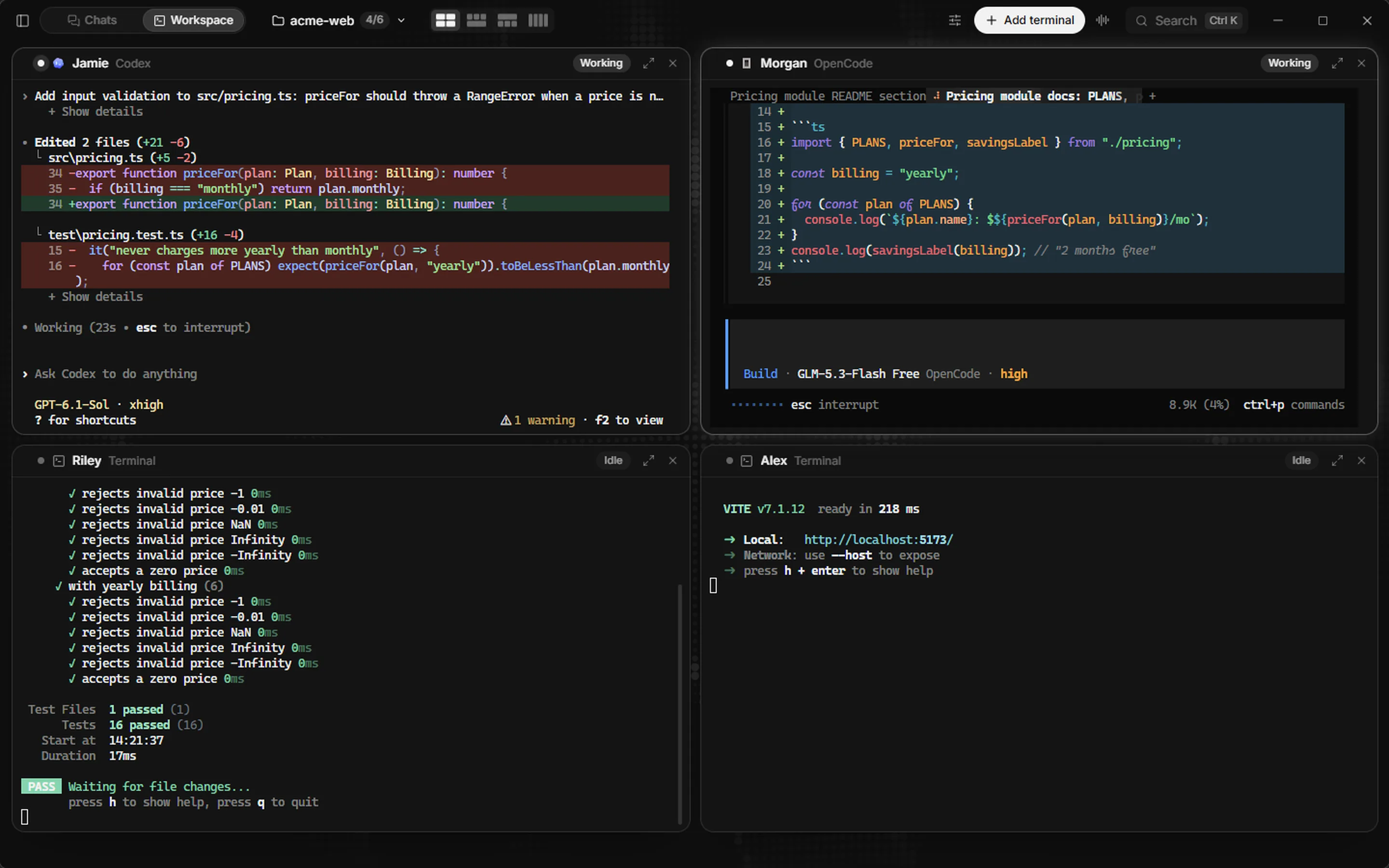
Recorded in Melvu with the real CLIs: about 45 seconds of work, shown in 18.
- CodexAdds RangeError validation and tests in 33 s
- OpenCodeWrites a README section on a free model in 17 s
- npx vitestWatches the tests go from 4 to 16 passing
- npm run devServes the app on localhost
Plan it. Run it in parallel. Check it.
Plan review, parallel agents and a built-in browser, for every agent you run.
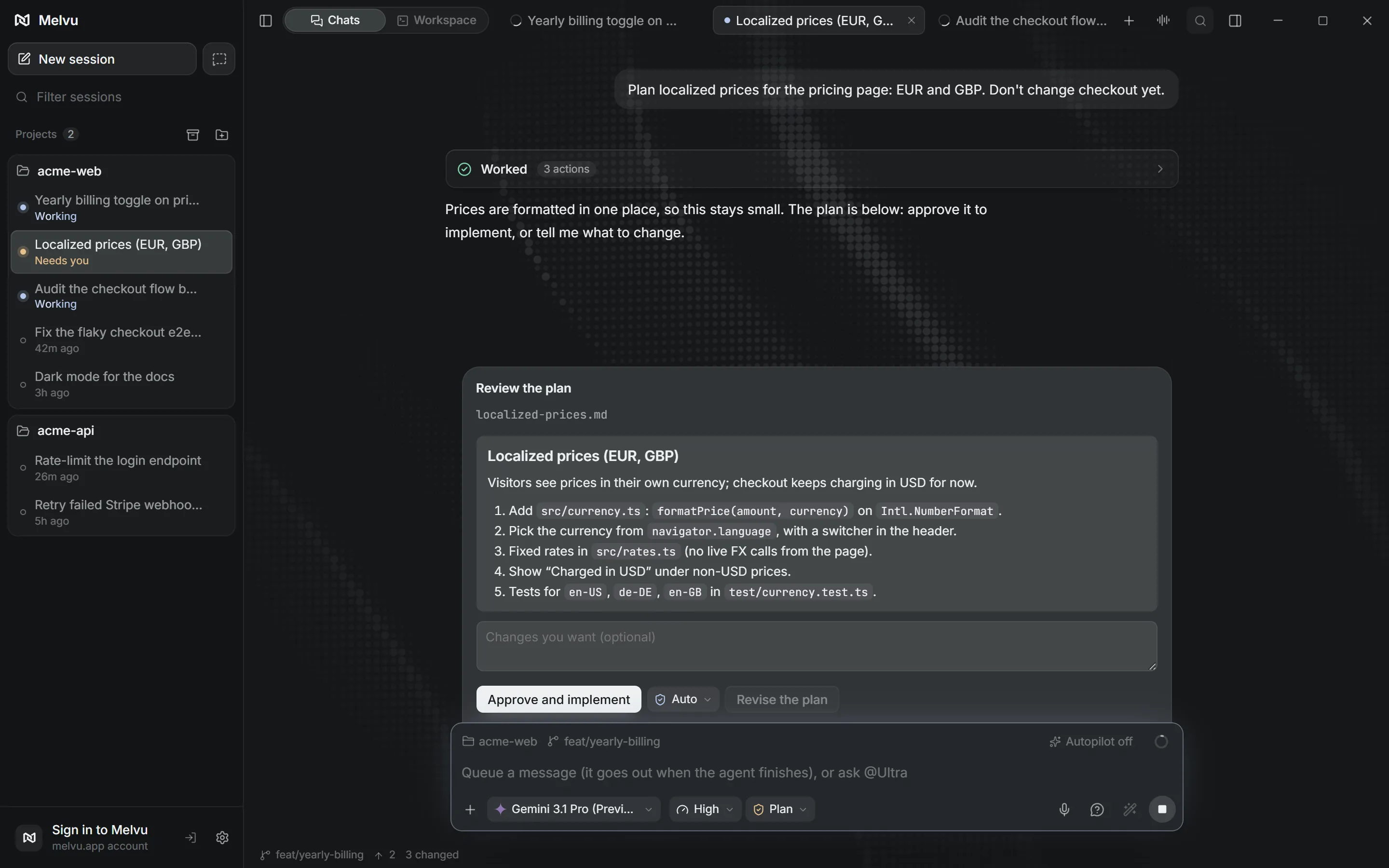
Review the plan before code
In Plan mode the agent reads your project and writes a plan. You approve it, ask for changes or send it back before any file changes.
Helper agents across providers
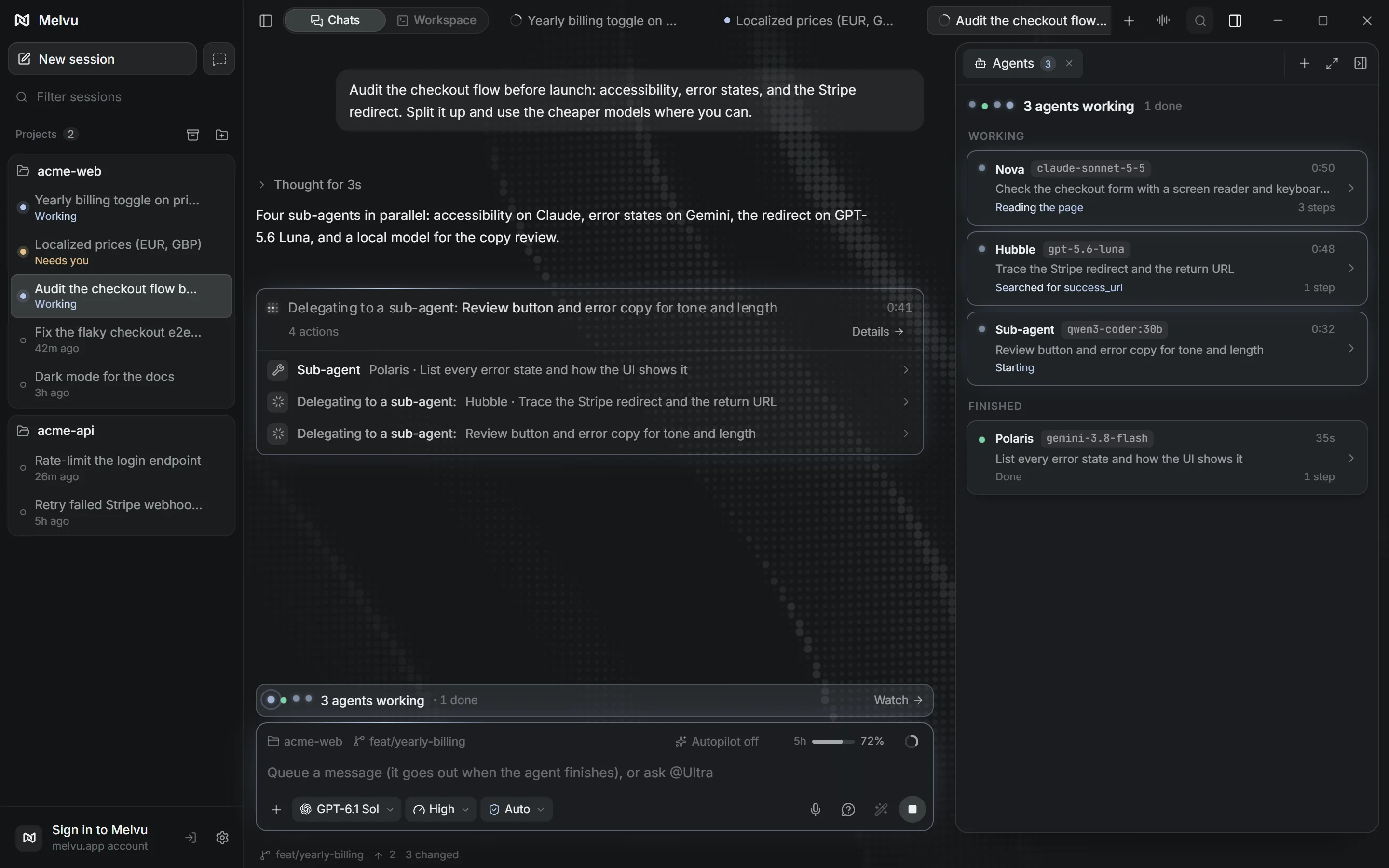
The agent splits a task into live sub-chats that run in parallel, each on any provider: a Codex chat can hand research to Claude.
Verify in the built-in browser
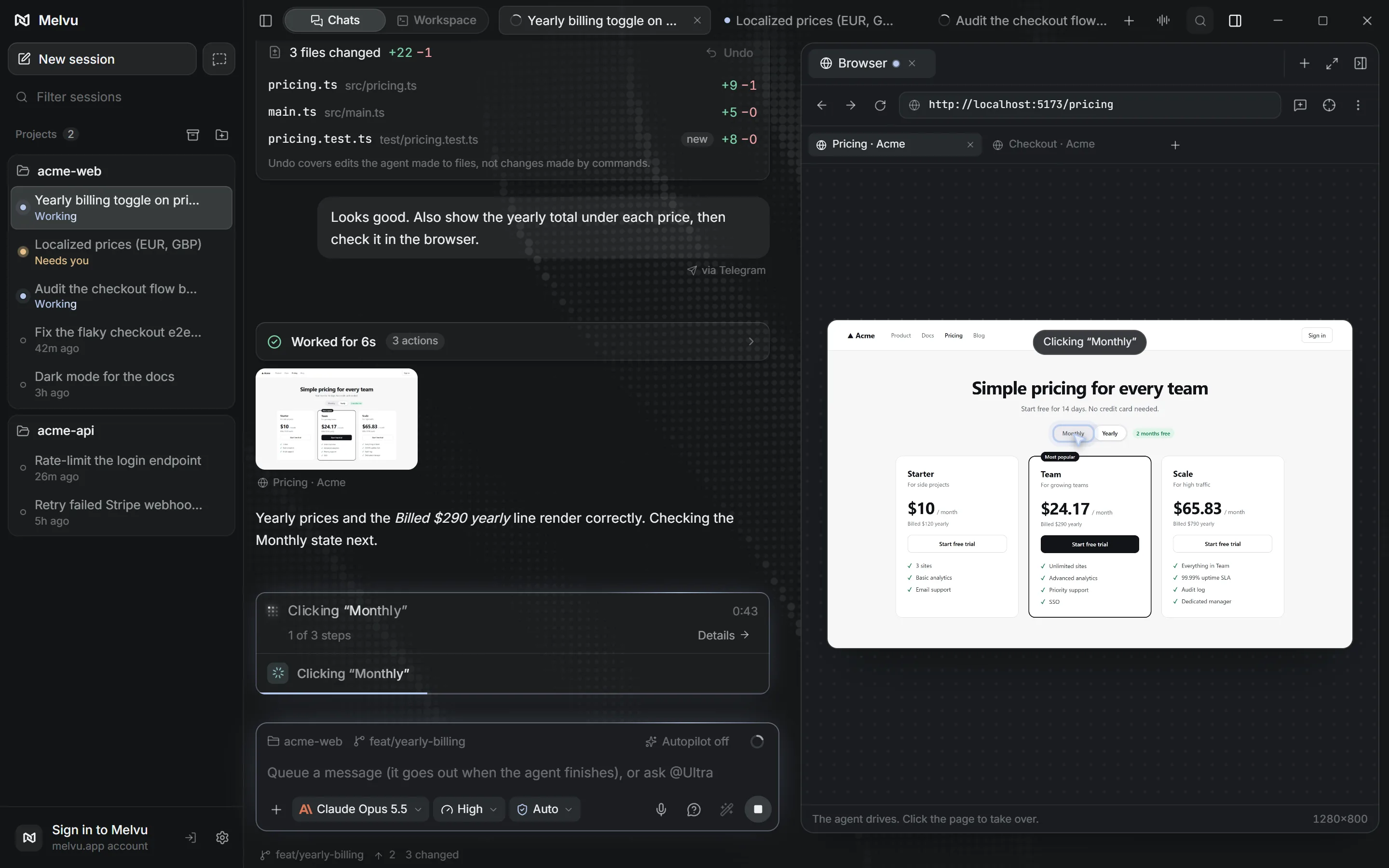
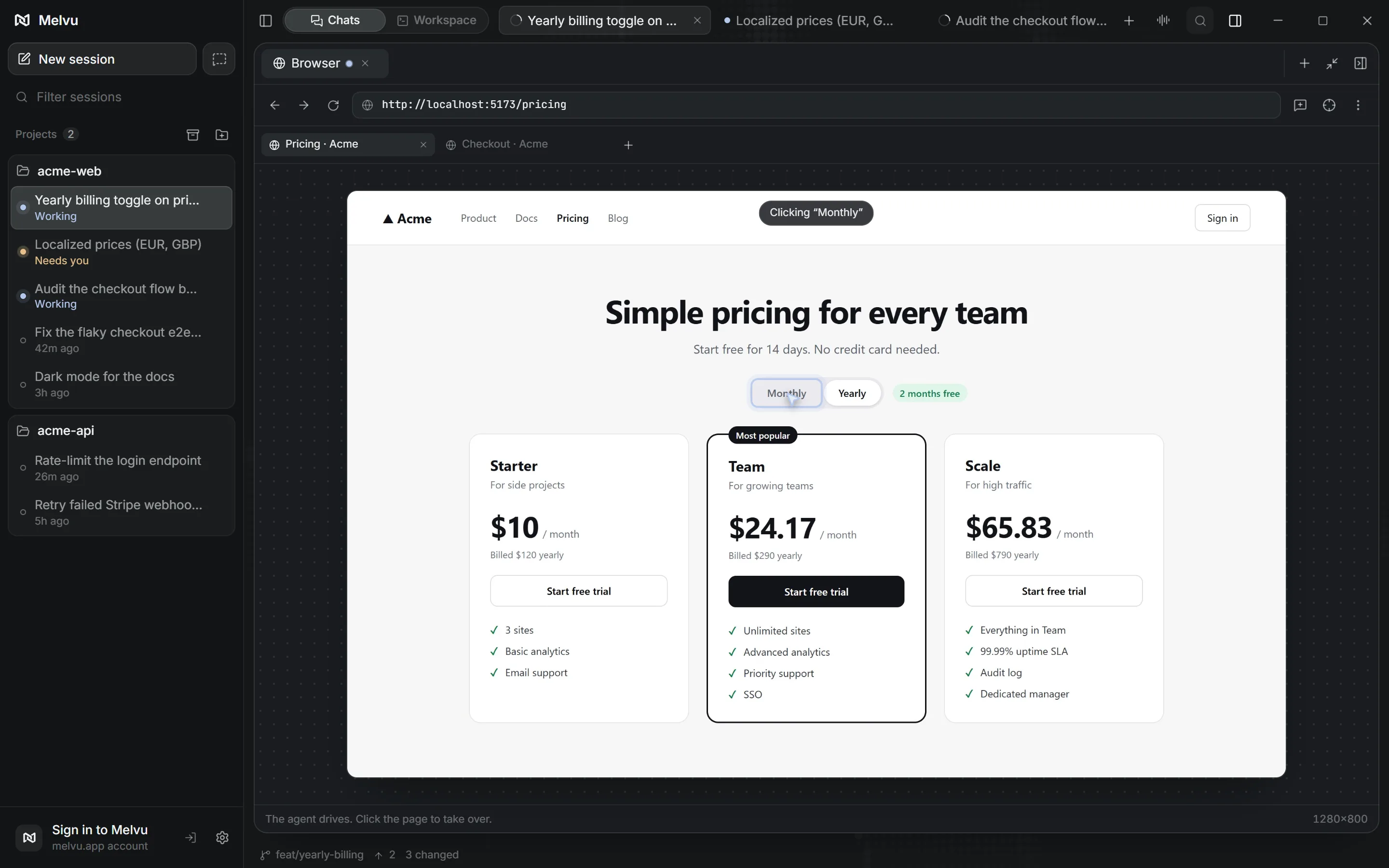
The agent opens your app in Melvu's own browser, clicks through it and fixes what it finds. You watch, and can take control at any time.
In good hands.
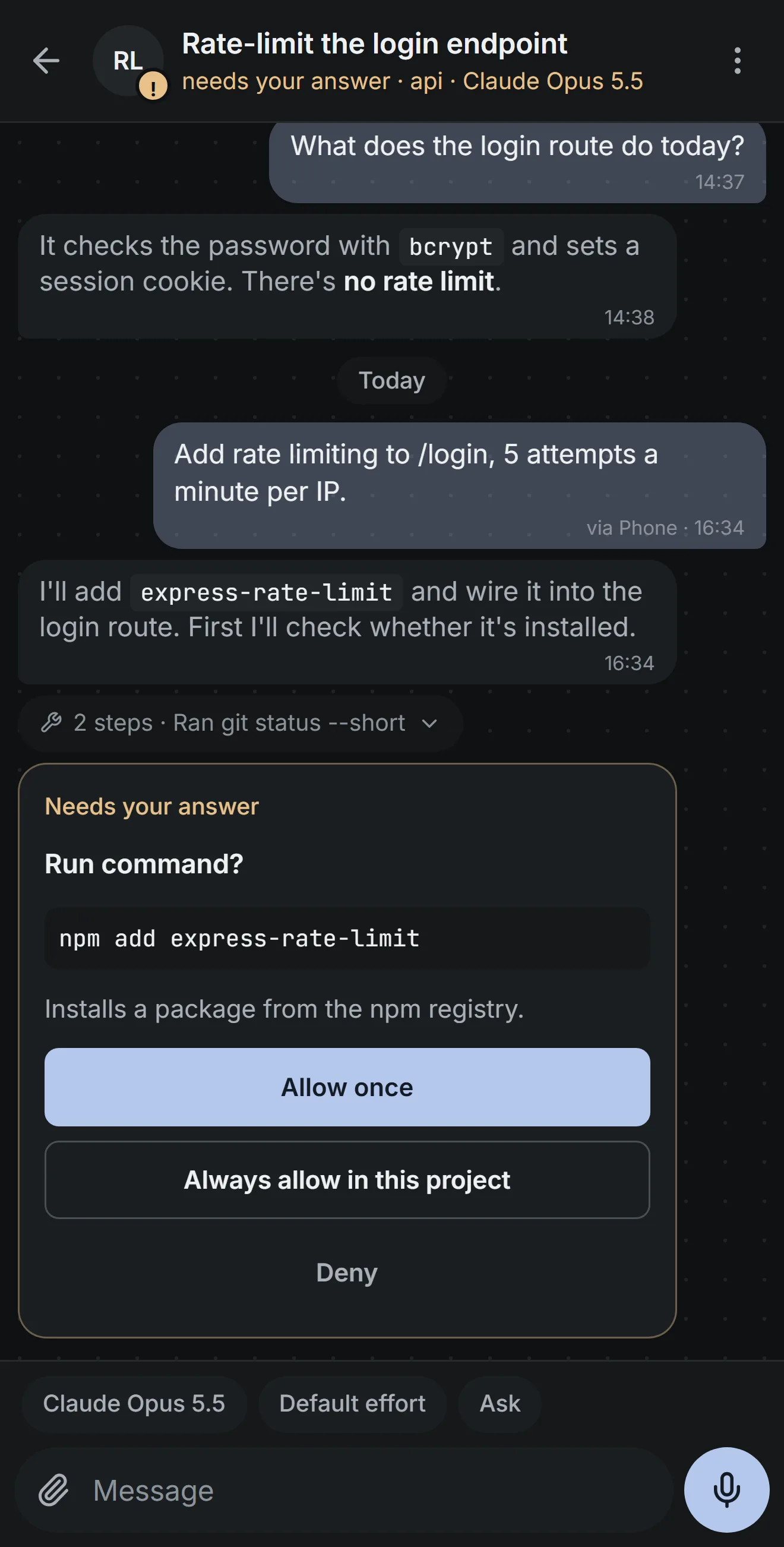
The agent does the work and you stay in charge. Approve the plan, allow or deny tool calls, and undo any file edit from its diff.
Step away. Stay in charge.
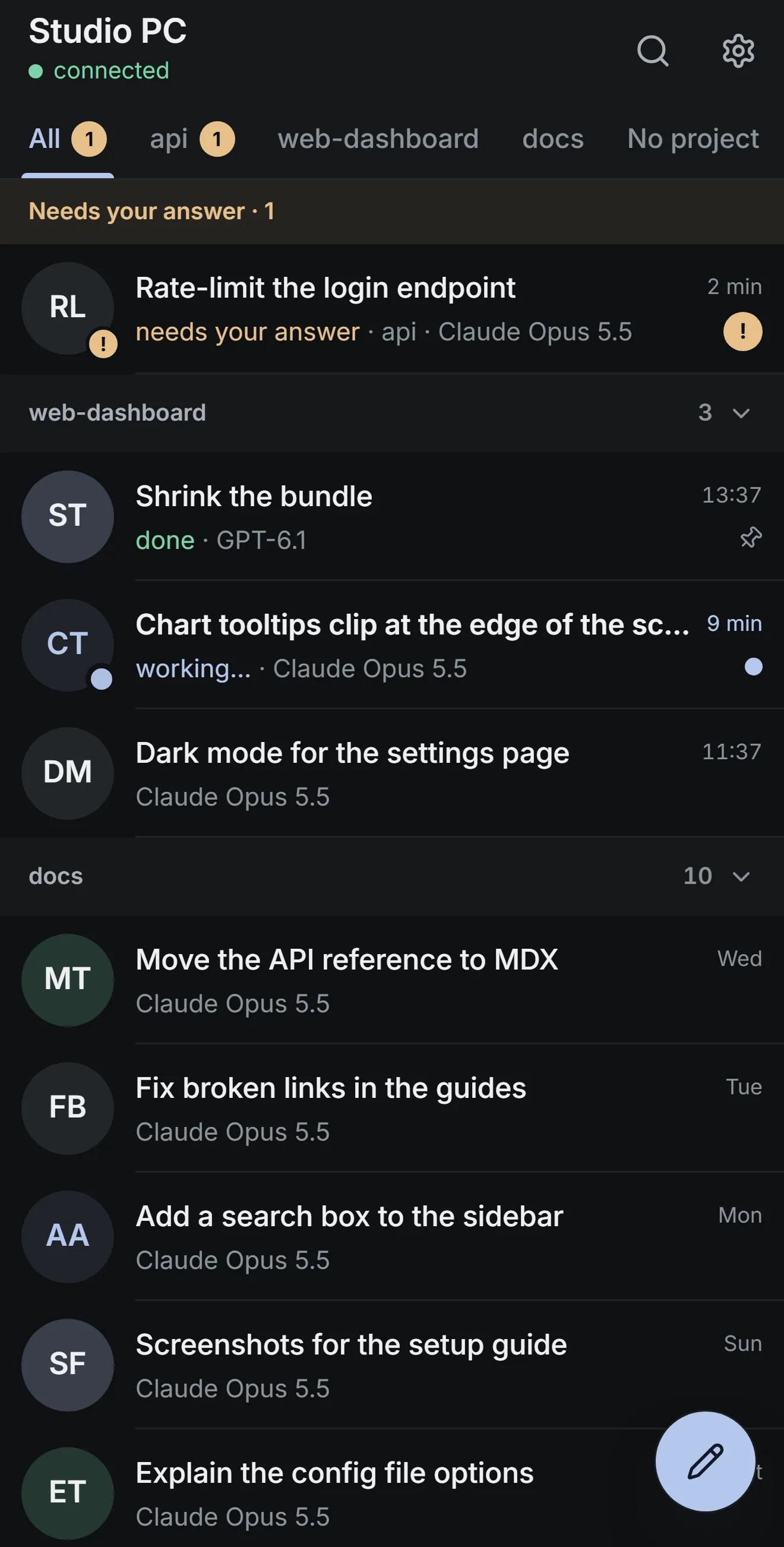
Melvu Remote puts every chat on your phone. When an agent needs you, answer it there and your computer carries on.
- Answer when it asksApprove a command, review a plan or answer a question. Your phone buzzes when an agent is waiting.
- Start work anywhereOpen a chat in any project, pick the model, effort and mode, or hold the mic and talk.
- See what changedFollow each run live, check the file changes and undo them, and watch the agent's browser.
- Private by designPaired with a QR code and end-to-end encrypted. Our relay passes messages on but can't read them.
A web app, no store install: open melvu.app/remote, scan the code from Settings → Phone in Melvu and add it to your home screen. Works on iPhone and Android while Melvu is open on your computer.

Everything an agent needs, in one window
Explore all featuresProject memory
Melvu remembers your project's decisions, conventions and preferences across chats and agents, so you don't repeat yourself.
- Tell it once: the package manager, how tests are written, the files to leave alone.
- Every agent knows it next time, from Claude Code to Codex to a local model.
- Each reply shows what it recalled. Edit or forget any memory from the Memory page.
Local models
Ollama, LM Studio or any OpenAI-compatible server, on this computer or one on your network.
MCP and skills
Add MCP servers from the connectors hub and use your skills in every agent, Claude Code and Codex included.
Terminal grid
Up to six real terminals per project, each running an agent's CLI or a plain shell.
Image generation
Create images and assets right inside your chats: ask for one, or type /image. They're saved into your project.
Computer use
Type @computer and the agent works in other apps on Windows and macOS 14 or later. Esc stops it.
Phone remote
Approve tool calls, start chats and follow progress from your phone, end-to-end encrypted.
Usage and limits
Tokens and cost across every agent, and what's left of your 5‑hour or weekly plan limit.
Ivy and dictation
Hold Ctrl+Space to dictate in any app, or talk to Ivy to check on chats and start work.
Simple pricing
One plan, Melvu Pro, with every feature. Bring your own AI accounts: Melvu doesn't include model usage.
Monthly
€9.99a month
Cancel any time from your account.
Start monthlyYearly
€99a year
€8.25 a month, €20.88 less than paying monthly.
Start yearly
Every agent, provider and local model, on Windows, macOS and Linux, with updates.
Prices in euros. No free trial. Payment runs through Stripe Checkout. Read the terms and the refund policy.
Questions
Short answers about accounts, platforms and billing. For anything else, email [email protected].
Does Melvu include Claude or ChatGPT usage?
No. Melvu sells access to the app. You bring your own AI accounts: a Claude or ChatGPT plan through each vendor's own agent, API keys billed by each provider, or local models that cost nothing to run.
Which agents and models work with Melvu?
Claude Code, Codex, Cursor's agent CLI, Grok Build, Antigravity, OpenCode and Pi with their own sign-ins, plus more agents from the public ACP registry. With an API key: Anthropic, OpenAI, Gemini, xAI, Microsoft Foundry, DeepSeek, Moonshot, Z.AI, MiniMax, Xiaomi, Sakana, Hugging Face, OpenRouter and OpenCode. Locally: Ollama, LM Studio and OpenAI-compatible servers. Any other agent with a command line runs in a terminal in the workspace grid, next to the rest.
Do I need Claude Code or Codex installed first?
To use your Claude or ChatGPT plan, yes: Melvu runs the CLI you installed and signed in to. Settings → Providers checks each agent and fixes common setup problems in one click. API-key providers and local models need no CLI.
Does Melvu remember my project between chats?
Yes. Melvu remembers your project's decisions, conventions and preferences across chats and agents, so you don't repeat yourself. Each reply shows what it recalled, and you can edit or forget any memory from the Memory page.
Which computers does Melvu run on?
Windows on x64, macOS on Apple Silicon, and Linux on x64 as an AppImage. Intel Macs are not supported. Computer use needs Windows or macOS 14 or later.
Is there a free trial?
No. You can pay monthly and cancel any time from Billing in your account; a cancelled plan stays active until the end of the period you paid for. The refund policy explains your withdrawal rights.
Where does my code go?
Your project stays on your computer. The agent sends what it needs to the model provider you picked, under that provider's terms. melvu.app checks your account and license; it doesn't receive your code.
Meet Melvu
Bring the agents you already use. Plan, run and check their work in one window.
Windows, macOS (Apple Silicon), Linux